/Logos/SupplyKick_Logo.svg "SupplyKick_Logo")


Standing out on Amazon isn’t just about listing your products—it’s about ensuring your brand gets seen by the right shoppers at the right time. With competition fiercer than ever, a well-structured advertising strategy is your ticket to driving real results and accelerating growth. Whether you’re completely new to Amazon ads or looking to optimize your approach, this step-by-step guide will walk you through everything from account creation to campaign launch. Plus, discover how working with an expert like SupplyKick can help you unlock even greater success. For a deeper dive into strategy, see our Amazon ads strategy page, or explore the full Amazon Advertising resource hub.
How to create an Amazon Ads account and access the console
Getting started begins with the basics: creating your Amazon Ads account and understanding the Amazon Ads console.
- Check your eligibility: You’ll need an active Seller Central or Vendor Central account in good standing. Only professional sellers can access Amazon’s advertising features.
- Sign up for Amazon Ads: Go to advertising.amazon.com and log in with your Seller or Vendor credentials. Follow the prompts to set up your profile, verify your business, and accept the terms.
- Access the Amazon Ads console: Once registered, you’ll land in the Amazon Ads console. This is your command center for campaign creation, reporting, and optimization. The dashboard is organized into Campaigns, Reports, Stores, and Measurement tools.
As a verified Amazon Advertising Partner Network member with exclusive Amazon Ads API access, SupplyKick brings advanced capabilities and insights to every campaign. Learn more about our approach on the Amazon Advertising page or visit our advertising services overview.
When setting up your account, it’s crucial to ensure your brand is enrolled in Brand Registry. This unlocks advanced advertising features, including A+ Content and access to Brand Analytics, which are essential for optimizing your campaigns and protecting your brand from listing hijacks and unauthorized changes. Proactive compliance measures, such as automated case raising and listing hijack monitoring, help maintain account health and safeguard your brand’s reputation from day one. According to a recent industry guide, Brand Registry unlocks tools like Brand Analytics and A+ Content—critical for data‑driven advertising and enhanced conversion outcomes.third-party analysis
How to set up Amazon advertising for beginners: launching your first campaign
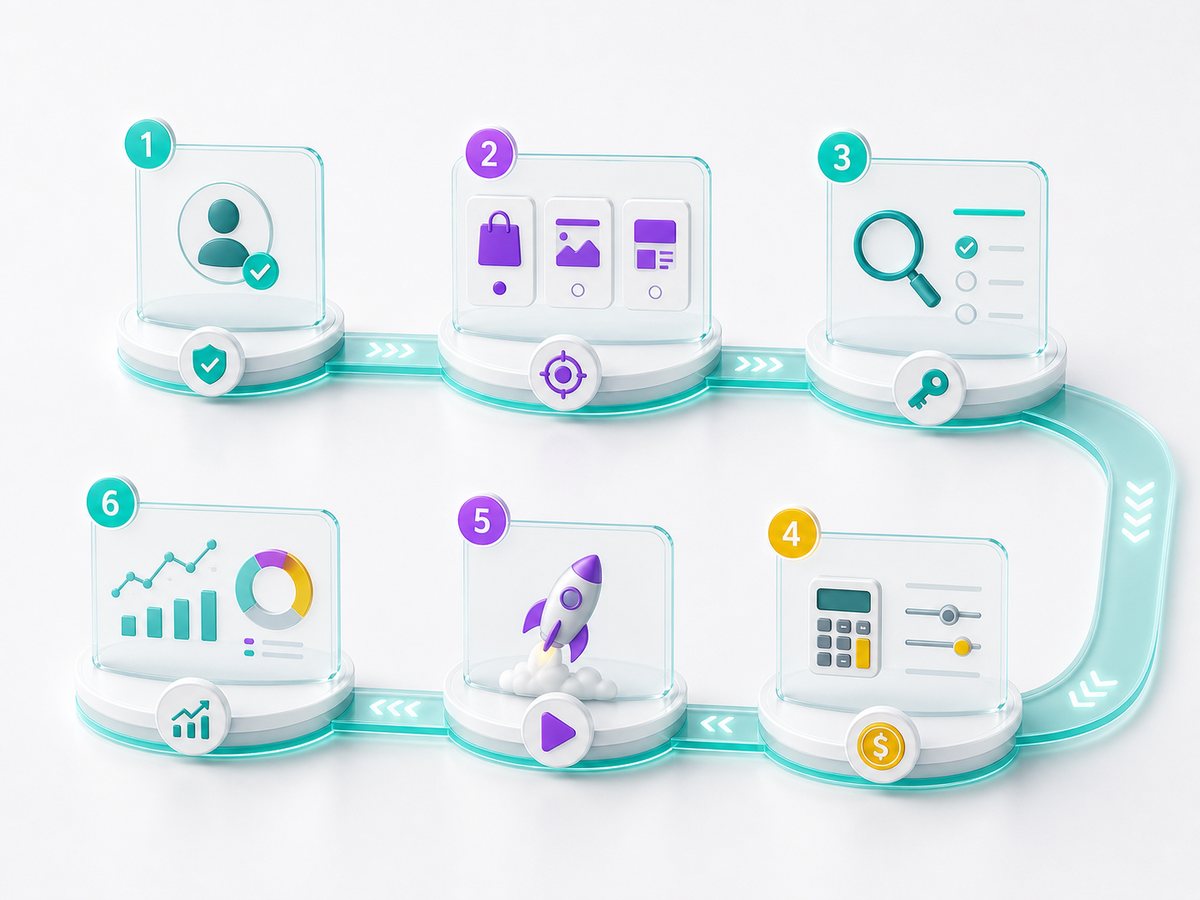
Setting up your first campaign in the Amazon Ads console is straightforward if you follow these steps:
- Choose your campaign type: Select from Sponsored Products, Sponsored Brands, or Sponsored Display. For most beginners, Sponsored Products is the best starting point.
- Select products to advertise: Pick your highest‑converting or highest‑priority SKUs.
- Set your campaign name, budget, and duration: Name your campaign clearly, set a daily or lifetime budget, and define your campaign dates.
- Choose targeting: Start with automatic targeting to let Amazon’s AI match your ads to relevant searches, or opt for manual targeting if you have a keyword list ready.
- Set your bids: Decide how much you’re willing to pay per click. Amazon will suggest ranges based on competition.
- Launch your campaign: Review everything and hit “Launch.”
Best practices for beginners:
- Start simple: One campaign per product or product group
- Use clear naming conventions for easy tracking
- Avoid mixing unrelated products in a single campaign
- Monitor daily for performance and budget pacing
Brands that start with a specialist like SupplyKick see faster, better results—our team manages hundreds of launches and brings proven frameworks. For more, visit our Amazon PPC Management page or read What is an Amazon PPC?.
For a seamless campaign launch, consider leveraging AI‑powered account management tools that provide 24/7 monitoring and instant alerts on campaign performance. These intelligent agents can automatically flag suppressed listings, restock limits, or compliance issues, allowing you to address problems before they impact your ads. This proactive approach not only streamlines campaign setup but also ensures your ads remain active and competitive, reducing downtime and lost sales opportunities. A recent Amazon guide recommends starting with Sponsored Products for beginners, highlighting how easy it is to create campaigns with automatic targeting to reach customers quickly.official Amazon guide
For more on the fundamentals, check out How does Amazon advertising work?.
How to start advertising on Amazon: campaign types and initial setup
Amazon offers several campaign types, each with unique strengths:
- Sponsored Products: Appear in shopping results and on product pages; ideal for driving direct sales.
- Sponsored Brands: Feature your logo and multiple products; great for brand awareness and cross‑selling.
- Sponsored Display: Target shoppers on and off Amazon; useful for retargeting and audience expansion.
For new advertisers, Sponsored Products is usually the best entry point. As you gain confidence, layer in Sponsored Brands for brand building and Sponsored Display to capture more demand.
Tips for structuring campaigns:
- Group similar products together for better budget control
- Use separate campaigns for different objectives (e.g., sales vs. awareness)
- Set clear goals for each campaign—this will guide your targeting and measurement
For a complete overview, revisit our Amazon Advertising resource.
When structuring your campaigns, it’s important to consider how your inventory planning and logistics can impact ad performance. Real‑time inventory forecasting ensures you don’t advertise out-of-stock items, which can waste ad spend and hurt your Buy Box eligibility. Integrating advertising with operational insights helps you maximize every dollar invested and maintain a seamless shopper experience.
If you’re interested in how these tactics fit into a broader marketing approach, see What is Amazon marketing services?.
What are the best practices for choosing keywords and targeting options when launching an Amazon advertising campaign?
Effective campaigns start with smart keyword and targeting strategies. Here’s how to set up Amazon advertising on PPC for maximum impact:
- Keyword research: Use Amazon’s suggested keywords, competitor ASINs, and tools like Brand Analytics to find high‑intent terms relevant to your products.
- Targeting options: Choose between automatic (Amazon matches ads to searches) or manual (you select keywords). Manual targeting gives more control, while automatic can surface new opportunities.
- Product and audience targeting: Go beyond keywords—target specific products, categories, or shopper audiences based on interests and behaviors.
Common mistakes to avoid:
- Using too broad or irrelevant keywords
- Overlapping targeting across campaigns (which can drive up costs)
- Ignoring negative keywords, which can prevent wasted spend
SupplyKick’s team delivers a step‑by‑step process that consistently drives a 60% average conversion rate increase for partners. Explore more on our Amazon PPC Management page.
Leveraging cross‑account insights and best‑practice patterns from managing multiple brands can reveal targeting opportunities that are often missed by single‑account operators. By analyzing trends across categories, you can identify high‑converting keyword ecosystems and refine your targeting to match real buyer behavior, not just search volume. This approach supports more precise audience segmentation and higher campaign efficiency.
For additional information on optimizing your campaigns, see What are some proven strategies to optimize my Amazon Ads campaigns for better ROI?.
What budgeting strategies should I use to maximize ROI for different types of Amazon advertising campaigns?
Budgeting is where strategy meets execution. Here’s how to set up Amazon advertising on PPC with a focus on ROI:
- Set an initial daily budget: Start with $20–$50 per campaign, then adjust based on performance.
- Allocate spend by campaign type: Prioritize Sponsored Products for direct sales, then test and scale Sponsored Brands and Display.
- Monitor and adjust: Check spend daily, adjust bids based on performance, and reallocate budget to top‑performing campaigns.
Wondering, “How much does it cost to advertise on Amazon?” The answer depends on your goals, competition, and category—see our detailed guide for a full breakdown.
With $200M+ in Amazon sales managed, SupplyKick’s ongoing optimization ensures your budget delivers maximum ROI at every stage.
To further maximize ROI, utilize real‑time dashboards and automated reporting to surface actionable insights 80% faster than manual methods. Instant access to performance data enables smarter, faster decision‑making—so you can reallocate spend, adjust bids, or pause underperforming ads without delay. This agility is especially valuable during peak sales periods or when responding to shifts in shopper demand.
For more on budgeting and agency costs, see How much does Amazon PPC agency cost?.
How to track and analyze Amazon advertising performance from day one
Success starts with measurement. The Amazon Ads console provides robust reporting—here’s what to track:
- ACOS (Advertising Cost of Sales): Measures ad spend as a percentage of sales
- ROAS (Return on Ad Spend): Shows how much revenue you earn for every dollar spent
- Click‑through rate (CTR): Indicates ad relevance and engagement
- Conversion rate: Reveals how well your ads turn clicks into sales
Use the console’s reporting tools to analyze trends, spot opportunities, and identify underperformers. Ongoing optimization is critical—most brands see their best results after weeks of testing and refinement. If you’re ready for expert help, see our advertising services.
Integrating AI‑powered analytics agents into your workflow can further enhance your ability to track, forecast, and act on performance data in real time. These agents not only monitor key metrics but also provide proactive recommendations and alerts, ensuring you never miss a critical shift in campaign effectiveness or account health.
When to manage Amazon advertising in‑house vs. when to bring in a specialist
Should you run campaigns yourself or work with an Amazon advertising expert? Consider:
In‑house management:
- Pros: Direct control, cost savings for simple setups
- Cons: Steep learning curve, limited access to advanced tools, risk of costly mistakes
Working with a specialist like SupplyKick:
- Pros: Step‑by‑step expertise, access to exclusive Amazon Ads API, 60% average conversion rate increase, hundreds of brand launches, proactive optimization
- Cons: Agency fees (often offset by higher returns and saved time)
If your campaigns are underperforming, you’re struggling to scale, or you want to unlock advanced capabilities, it’s time to talk to a specialist.
Working with an agency that offers a flexible partnership model—acting as an extension of your team rather than a full takeover—allows you to maintain control over your account, inventory, and messaging while still benefiting from expert guidance. This collaborative approach ensures your internal team stays informed and empowered, while leveraging external expertise to accelerate growth and navigate complex marketplace dynamics.
Want to get your Amazon advertising set up the right way from the start? Let’s talk.
---
Unlock the full potential of your brand with Amazon Advertising and stay ahead in the competitive e‑commerce landscape. Ready to boost your visibility and drive more sales? Start your Amazon Advertising journey today by exploring our expert tips and resources—your next big breakthrough is just a click away!



/Logos/SupplyKick/SupplyKick-Logo_White.svg "SupplyKick-Logo_White")