/Logos/SupplyKick_Logo.svg "SupplyKick_Logo")


A product listing is never finished. Keywords drift. Competitors add better images. Reviews surface objections your bullets don't answer. Pricing changes. New questions appear. Your listing either keeps up or it falls behind.
Most Amazon checklist content treats everything as a one-time setup task. That is not how listing optimization works in practice. Some checks belong in a monthly review. Others are launch-time work. A few are quarterly deep refreshes. If you run the same giant audit every month, you waste time. If you never revisit finished listings, you miss easy wins.
This checklist separates the work by cadence so you can focus on what actually matters each month.
What This Amazon Product Listing Checklist Covers
Who this checklist is for
This is for sellers and brand managers who already operate on Amazon and want a repeatable process for keeping listings competitive. If you're launching your first product, you need the full setup checklist. If you're maintaining live listings, start here.

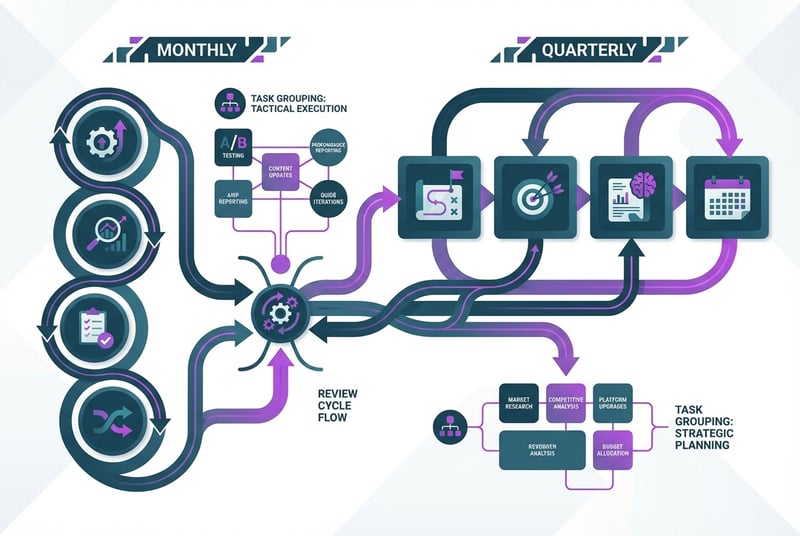
Monthly vs. launch-time vs. quarterly tasks
Monthly
- Keyword drift checks
- Image order relevance
- Review and Q&A mining
- Pricing and promotion alignment
- Listing health scans
- Performance readout after updates
Launch or Pre-Publish
- Title build
- Bullet structure
- Backend search terms
- Initial image stack
- A+ Content modules
- Compliance review
- Variation setup
Quarterly Deep Refresh
- Creative overhaul
- Benefit repositioning
- Comparison chart updates
- Parent-child assortment cleanup
- Larger SEO retest
This article focuses on the monthly cycle. The launch and quarterly tasks get a short reference section at the end.
Start With Search Visibility
Re-check primary and secondary keywords
Amazon's search behavior changes. Your competitors adjust their titles. New products enter the category. The keywords that worked six months ago might not be the strongest fit today.
Pull your current primary and secondary keywords. Check recent search volume and category fit using Amazon-specific keyword tools or your existing research stack. If a core keyword lost relevance or a stronger synonym emerged, flag it for a title or backend terms update.
Do not change keywords just to change them. Only update when the data shows a better option.
Review title indexing and keyword placement
Amazon's title rules tightened in 2025. Most categories now cap titles at 200 characters including spaces. The same word can't appear more than twice except for prepositions, articles, and conjunctions. Certain special characters are disallowed.
Check whether your current title still complies. If it's close to the limit or uses older keyword-stuffing patterns, tighten it. Prioritize readability and product clarity over jamming in extra terms.
Confirm your title still indexes for your primary keyword. If indexing dropped or your title no longer surfaces in expected searches, investigate whether a policy violation or competitor shift caused the change.
Refresh backend search terms without duplication
Amazon's guidance on backend search terms is explicit: use the Generic keyword field, add synonyms and spelling variations, separate with spaces instead of punctuation, no repetition, no brand names, no ASINs, no subjective claims like "best."
Review your current backend terms. Remove any duplicates that already appear in your title, bullets, or description. Cut brand names, competitor names, and filler words. Replace weak or irrelevant terms with fresh synonyms or category-specific variations.
Backend terms are not a dumping ground. Treat them as a cleanup exercise.
Tighten the Parts of the PDP That Drive Conversion
Audit title clarity and mobile readability
Most Amazon shoppers browse on mobile. Your title needs to make sense in the first 50 characters because that's what fits on a small screen before truncation.
Read your current title on a phone. Does it clearly communicate what the product is and what makes it different? If the first half is generic brand-category language, reorder it so the key differentiator appears sooner.
A strong mobile title answers "what is this?" in the first line.
Rewrite bullet points around buyer questions and benefits
Your bullets should answer the questions shoppers ask before they buy. If they don't, your listing is doing less work than it should.
Review your current bullets. Do they explain what the product does, how it solves a problem, what's included, and what makes it different from similar options? Or do they just list features without context?
Rewrite weak bullets to connect features to outcomes. Instead of "stainless steel construction," say "stainless steel body resists rust and wipes clean in seconds." Instead of "adjustable settings," say "three speed settings so you can match power to the task."
Bullets are not a spec sheet. They are selling copy.
Refresh product description or A+ Content
Your product description and A+ Content modules give you more space to explain fit, use cases, comparison details, and objection handling. If your description is thin or your A+ modules haven't changed in a year, they are probably stale.
Check whether your current content still matches your assortment. If you added new sizes, colors, or variations, update comparison charts and feature callouts. If customer reviews surfaced new use cases, add them to lifestyle or scenario sections.
A+ Content is not decoration. It reduces returns and improves conversion when it answers real buyer questions.
Check whether the brand story still matches the assortment
If your product line expanded, your brand story might be out of sync. A brand story written for three SKUs doesn't work the same way when you're selling fifteen.
Review your brand story module. Does it still fit the current catalog? Does it position the brand in a way that supports the full assortment? If not, update it during your next quarterly refresh.
Review Your Image Stack and Video Assets
Confirm the main image meets current best practice
Amazon's main image rules are strict: pure white background, product fills about 85% of the frame, no text, logos, or watermarks, adequate resolution for zoom. If your main image violates any of these, it can suppress your listing in search.
Check your current main image. Does it comply? Does it show the product clearly at the right scale? If the image is compliant but weak, flag it for a reshoot.
Your main image is the first thing shoppers see. If it's unclear or off-center, they scroll past.
Reorder secondary images for shopper decision-making
Amazon recommends at least six images and one video. You probably have enough images. The question is whether they're in the right order.
Secondary images should answer buyer questions in sequence, not just fill slots. A practical order:
| Position | Image Type |
|---|---|
| 1 | Main image (compliant product shot) |
| 2 | Top benefits infographic |
| 3 | Scale or dimensions image |
| 4 | Lifestyle or use-case image |
| 5 | Comparison or feature proof image |
| 6 | Packaging, what's included, or compatibility image |
| 7 | Video or richer demo asset |
Review your current image stack. Are the first few images doing the most work? If your best infographic is buried at position five, move it up.
Add infographic, comparison, and lifestyle gaps
Walk through your image stack and list what's missing. Do you have a clear size comparison? A benefit callout graphic? A lifestyle shot that shows the product in use? A compatibility or what's-included diagram?
If a key question is unanswered, add an image that fills the gap. If you already have all the critical images, this step is done.
Decide when a video update is worth it
Amazon recommends video, and video can improve conversion. But video production is expensive. Only update your video if the current one is outdated, low quality, or missing a key use case that reviews keep asking about.
If your video still answers the right questions and the product hasn't changed, leave it alone.
Protect Listing Health and Availability
Check for suppressed content, stranded edits, or contribution conflicts
Amazon listing errors are common. Missing copy, suppressed images, stranded inventory, and contribution conflicts all hurt discoverability and conversion.
Run a listing health scan. Check Seller Central for suppressed content warnings, stranded inventory alerts, and contribution errors. If anything is flagged, fix it immediately.
The longer listing errors sit unfixed, the more sales you lose.
Review inventory position and in-stock risk
If your product goes out of stock, it disappears from most search results. Staying in stock is not optional.
Check your current inventory position. How many days of stock do you have at current velocity? Are you at risk of running out before your next shipment arrives? If your in-stock window is tight, adjust your forecast or expedite replenishment.
A well-maintained listing with no inventory is worthless.
Confirm price, coupon, and promotion alignment
Your listing's price, coupon, and promotion setup should align with your current sales strategy. If you're running a Lightning Deal but your base price is too high, the deal won't convert. If your coupon expired last week, remove it.
Review your current pricing and promotion stack. Is everything still active and accurate? If not, update it.
Price and promotion misalignment kills conversion even when the rest of your listing is strong.
Use Customer Signals to Improve the Listing
Mine reviews and Q&A for copy updates
Your reviews and Q&A are free market research. They tell you what buyers care about, what confuses them, and what your listing doesn't explain well enough.
Read your most recent 20-30 reviews. What do people praise? What do they complain about? What questions appear repeatedly in Q&A?
If multiple reviews mention sizing confusion, add a sizing chart or measurement image. If Q&A keeps asking whether the product includes batteries, add that detail to your bullets and what's-included image. If reviews praise a specific benefit, move that benefit higher in your copy hierarchy.
Customer signals tell you what to fix. Use them.
Watch return reasons and support tickets for friction points
Returns and support tickets reveal gaps between what your listing promises and what the product delivers.
Check your return reasons and support ticket themes. Are customers returning because the product didn't fit, didn't include expected parts, or didn't work the way the listing suggested? If a pattern emerges, update your listing to set clearer expectations.
A listing that over-promises creates returns. A listing that answers objections upfront reduces them.
Identify objections the listing still does not answer
Walk through the buying decision as if you're a skeptical shopper. What questions would stop you from clicking "Add to Cart"? Does the listing answer all of them?
If an objection is unanswered, add content that addresses it. If your listing already covers the major objections, this step is done.
Measure Whether the Update Worked
Metrics to watch after a listing refresh
Updating a listing is pointless if you don't measure the result.
After a listing change, track:
- Sessions and impressions
- Click-through rate from search results (if available)
- Conversion rate / unit session percentage
- Keyword indexing and rank shifts
- Review velocity and Q&A patterns
- Returns or complaint themes
- Ad efficiency after PDP improvements
Compare the two-week period after the update to the two weeks before. Did sessions increase? Did conversion improve? Did returns drop?
If the update didn't move the metrics, investigate why and test a different approach.
How long to wait before making the next major change
Give updates time to settle. Amazon's system needs a few days to re-index changes, and buyer behavior takes a week or two to stabilize.
Wait at least two weeks before making another major content change. If you update too frequently, you won't know which change drove which result.
Small fixes like correcting a typo or updating a price can happen anytime. Major rewrites to titles, bullets, or image stacks should be spaced out.
What belongs in a quarterly deep refresh
Some updates are too big for a monthly cycle. Save these for quarterly reviews:
- Complete creative overhaul (new images, new video, new A+ modules)
- Benefit repositioning or messaging pivot
- Comparison chart updates after line extensions
- Parent-child assortment cleanup
- Larger SEO retests with new keyword clusters
Monthly reviews keep listings healthy. Quarterly refreshes keep them competitive.
Common Amazon Listing Mistakes to Catch Early
Keyword stuffing and unreadable titles
Titles that repeat the same word five times or cram in irrelevant keywords hurt readability and risk policy violations.
If your title is hard to read or looks spammy, simplify it. Prioritize clarity over keyword density.
Image sets that explain features but not value
Images that show product dimensions without explaining why the size matters, or materials without showing the benefit, waste image slots.
Every image should answer a buyer question or reinforce a reason to buy.
Backend terms that waste indexable space
Backend keyword fields filled with repeated words, brand names, or filler terms don't help discoverability.
Clean up your backend terms. Only include synonyms, spelling variations, and category-specific keywords that don't already appear in your visible content.
Driving traffic to a weak or stale PDP
Running ads to a listing with unclear bullets, outdated images, or missing A+ Content wastes ad spend.
Fix the listing before you scale traffic to it. A strong PDP converts traffic. A weak one burns budget.
When to Bring in Outside Help
Signs the listing issue is bigger than copy alone
If your listing performance dropped and you've already updated keywords, images, bullets, and pricing, the issue might be category competition, ad strategy, inventory health, or catalog structure. Those problems require broader account management, not just listing edits.
Where SupplyKick fits
At SupplyKick, we manage Amazon listings as part of a larger account strategy that includes advertising, inventory planning, creative production, and catalog management. If your listing issues are tangled with ad efficiency, stock availability, or competitive pressure, we can help you untangle them.
Whether you're managing one product or a full catalog, the day-to-day work of keeping listings competitive is time-intensive. Connect with us and we'll show you how we manage listing optimization for our partners so they can focus on product development and business growth instead of chasing monthly PDP updates.

FAQ
What should be included in an Amazon product listing?
A complete Amazon product listing includes: title, bullet points, product description, A+ Content (if you have Brand Registry), main image, at least five secondary images, video (recommended), backend search terms, pricing, and fulfillment method. Strong listings also address common buyer questions in Q&A and use customer reviews to refine copy and images.
How often should you update an Amazon listing?
Run a monthly review to check keyword relevance, image order, review themes, pricing alignment, and listing health. Make updates when customer signals, performance data, or policy changes require them. Save major creative overhauls for quarterly deep refreshes. Avoid updating too frequently or you won't be able to measure what worked.
How many images should an Amazon listing have?
Amazon recommends at least six images and one video. More images can help if they answer real buyer questions, but only add images that do useful work. Weak filler images don't improve conversion.
What belongs in Amazon backend search terms?
Backend search terms should include synonyms, spelling variations, and category-specific keywords that don't already appear in your title, bullets, or description. Do not repeat words, include brand names, use ASINs, add punctuation, or make subjective claims like "best." Amazon's guidance is explicit: backend terms are for discoverability, not marketing language.




/Logos/SupplyKick/SupplyKick-Logo_White.svg "SupplyKick-Logo_White")