/Logos/SupplyKick_Logo.svg "SupplyKick_Logo")


Updated March 2026
One of the biggest missed opportunities on Amazon: brands treat A+ Content like a design project instead of a conversion project.
A+ Content sits below the fold on your product detail page. It’s the space where you can show shoppers why your product is different, what problems it solves, and which version fits their needs best. When it’s built from shopper research, it reduces bounce, increases add-to-cart, and keeps people inside your brand instead of clicking over to a competitor.
When it’s built from templates and guesswork, it looks nice and does nothing.
This guide walks through what Amazon A+ Content is now, who can use it, when it’s worth the effort, how to create it, and what actually improves conversion.
What Is Amazon A+ Content?
Amazon A+ Content is visual content you add to your product detail page below the main product images and bullet points. It lets you show benefits, features, comparisons, use cases, and brand story in a richer format than the default listing structure allows.
There are three types:

Basic A+ Content: Up to 5 modules. Text, images, comparison charts, feature callouts. Free for Brand Registry sellers.
Premium A+ Content: Up to 7 modules. Includes everything in Basic plus video, interactive hotspots, carousels, Q&A modules, and shoppable content. Free for eligible Brand Registry sellers.
Brand Story: A separate content block that appears in the “From the brand” section. Focused on your mission, product family, and catalog. Free for Brand Registry sellers.
Where A+ Content Appears on the Product Detail Page
Basic and Premium A+ Content appear in the main product description area, after the bullet points and before customer reviews.
Brand Story appears in a dedicated “From the brand” card that shoppers can expand to see your brand mission, product lineup, and store link.
Both surfaces are mobile-visible and indexed by Amazon’s search algorithm.
Why It Matters for Conversion, Trust, and Brand Storytelling
A+ Content does three jobs:
Reduces decision friction. Shoppers who don’t understand what makes your product different will leave the page or compare against cheaper alternatives. A+ Content answers objections before they turn into bounce.
Keeps traffic inside your brand. Comparison charts and product-family modules redirect uncertain shoppers to a better-fit SKU instead of losing them to a competitor listing.
Builds trust on a crowded marketplace. Brands that control their visual identity, explain their positioning clearly, and show proof of quality convert better than brands that rely on default listing templates.
Amazon reports that well-executed Basic A+ Content increases sales by up to 8%. Well-executed Premium A+ Content increases sales by up to 20%.
Who Can Use Amazon A+ Content?
You need Brand Registry to create A+ Content. That means you must own or have authorization to use a registered trademark.
Once enrolled in Brand Registry, you get access to:
- Basic A+ Content (all Brand Registry sellers)
- Premium A+ Content (available to sellers who meet Amazon’s criteria, typically based on brand performance and account health)
- Brand Story (all Brand Registry sellers)
If you sell on Vendor Central, you also have access to A+ Content, though the workflow and module options differ slightly.
Basic A+ Content vs Premium A+ Content vs Brand Story
Basic A+ Content is the starting point. You get up to 5 modules. Use it for:
- Feature and benefit callouts
- Comparison charts
- Product specs and dimensions
- Use-case visuals
- Brand differentiation
Premium A+ Content adds interactive modules. You get up to 7 modules. Use it when:
- Video demonstrates the product better than static images
- Hotspots help shoppers explore complex features
- Carousels show multiple use cases or variations
- Q&A modules answer common objections inline
Brand Story is a separate surface. Use it for:
- Brand mission and positioning
- Product family overview
- Cross-sell to other SKUs
- Store link and catalog continuity
Most brands should start with Basic A+ Content on their top ASINs. Add Premium and Brand Story once the basics are working.
When A+ Content Is Worth the Effort
Not every ASIN deserves A+ investment yet.
Which ASINs To Prioritize First
Start with products that already have:
Traffic. If the ASIN gets fewer than 50 sessions per week, fix visibility first.
Differentiation. If the product is a commodity with no meaningful positioning, A+ won’t fix that.
Clear objections. If reviews and Q&A show recurring confusion or hesitation, A+ can address it.
Margin. High-margin products justify more creative investment.
Good first candidates:
- Hero SKUs with strong traffic but conversion below 10%
- Products with high return rates driven by mismatched expectations
- ASINs where competitors have weak or generic A+ Content
- Products with complex specs or use cases that need visual explanation
When A+ Will Not Fix a Weak Listing or Weak Offer
A+ Content will not compensate for:
- Poor main images or missing lifestyle shots
- Weak reviews (below 4 stars with common quality complaints)
- Uncompetitive pricing or shipping speed
- Missing or low-quality bullet points
- Products with no clear differentiation or category fit
Fix those first. Then build A+.
How To Create Amazon A+ Content
A+ Content should start with research, not module selection.
Planning Inputs: Reviews, Q&A, Competitor PDPs, and Brand Assets
Before opening the A+ Content Manager, gather:
Customer reviews. What objections show up repeatedly? What features do buyers call out as decision-makers? What expectations were mismatched?
Questions and Answers. What do shoppers ask before buying? What information is still unclear after reading the bullets?
Competitor product pages. What do top-performing competitors show in their A+ Content? Where are the gaps in their messaging? What can you explain better?
Brand assets. High-quality images, brand colors, typography, logos, product photography, comparison data, dimension specs, use-case scenarios.
Your A+ brief should answer: What does the shopper still not understand after viewing the main images and reading the bullets?
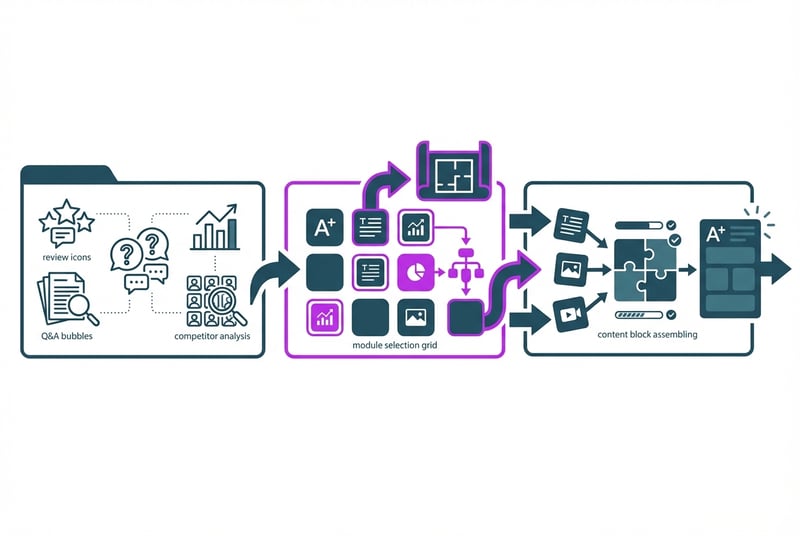
Choosing Modules and Structuring the Story
A+ Content should follow a logic, not just fill space.
A strong structure:
Lead with the benefit, not the feature. Show what the product does for the shopper, not just what it is.
Address the biggest objection early. If size confusion drives returns, show dimensions visually. If material quality is questioned, explain sourcing and construction.
Use comparison charts to keep shoppers inside the brand. Redirect to the right SKU instead of losing them.
Show use cases when the product serves multiple needs. One image per scenario.
Close with specs or what’s-in-the-box details for shoppers who need technical confirmation.
Module types to use:
- Standard image + text for feature callouts and benefit explanations
- Comparison chart to show product family or feature differences
- Four-image + text for use-case scenarios or multi-benefit products
- Image hotspots (Premium) for complex products where shoppers need to explore features visually
- Video (Premium) when the product benefit is easier to demonstrate than describe
- Q&A module (Premium) to answer common objections inline
Avoid:
- Modules that repeat what the bullets already say
- Dense text blocks that shoppers skip on mobile
- Comparison charts that include competitor products (Amazon prohibits this)
- Images overloaded with small text that breaks down on phone screens
Submitting and Getting Approval in Seller Central
Once your A+ Content is built:
Preview on mobile. Most Amazon shoppers browse on phones. If the text is unreadable or the layout breaks, fix it before submitting.
Check compliance. Remove any pricing, promotional language, warranty claims, hyperlinks, QR codes, or direct competitor comparisons. Substantiate any awards or endorsements with proof.
Submit through A+ Content Manager. Amazon reviews submissions for compliance. Approval usually takes 7 business days, though it can be faster.
Apply the content to ASINs. You can use the same A+ Content across multiple ASINs in the same product family.
If your submission is rejected, Amazon will flag the issue. Common rejection triggers: prohibited claims, unsubstantiated comparisons, poor image quality, or non-compliant formatting.
A+ Content Best Practices That Improve Conversion
Show Benefits Visually, Not With Long Copy Blocks
Shoppers scan. They do not read paragraphs of marketing copy on a product page.
Use images to show:
- What the product looks like in use
- Size and scale relative to familiar objects
- Feature callouts with short labels
- Before/after or problem/solution visuals
Keep text short. One or two sentences per module. If you need more explanation, break it across multiple modules.
Build for Mobile Scanning
Amazon’s mobile traffic is high. If your A+ Content is not readable on a phone, it’s not working.
Mobile-first rules:
- Use large, clear fonts. Text smaller than 18pt on the source image will be unreadable on mobile.
- Minimize text in images. Amazon may crop or resize images for mobile. Keep critical text in HTML fields, not image overlays.
- Test the preview in A+ Content Manager. Amazon shows desktop and mobile previews. If the mobile version looks broken, redesign it.
- Avoid complex layouts. Simple grids and clear visual hierarchy work better than dense infographics.
Use Comparison Charts To Keep Shoppers Inside Your Catalog
Comparison charts are one of the highest-value modules.
They do more than upsell. They keep uncertain shoppers from leaving your listing to compare against competitors.
Good comparison chart uses:
- Show three to four SKUs from your product family
- Highlight the key differentiators (size, capacity, features, use case)
- Make it easy to identify which version fits the shopper’s need
- Include “Shop Now” links to redirect to the right ASIN
Bad comparison chart uses:
- Comparing your product against named competitors (prohibited)
- Showing too many SKUs with no clear decision logic
- Using vague language like “better” or “best” without context
Address Objections Before They Turn Into Bounce or Return Risk
If your reviews and Q&A show recurring objections, your A+ Content should answer them.
Examples:
“Is this the right size?” Show dimension callouts, comparison to familiar objects, or fit guidance.
“Will this work with my setup?” Show compatibility specs or visual confirmation.
“What’s included in the box?” Show what’s-in-the-box module with labeled components.
“Is the material actually good quality?” Explain sourcing, construction, or testing standards with visuals.
“How do I use this?” Show step-by-step visuals or use-case scenarios.
The goal: answer the question before the shopper leaves the page to find the answer somewhere else.
Common A+ Content Mistakes
Generic Templates With No Brand Point of View
Amazon provides default templates. Most sellers use them. That means most A+ Content looks the same.
If your A+ reads like a product spec sheet with stock photography, it’s not differentiated. Build custom layouts that reflect your brand identity and positioning.
Too Much Text and Weak Hierarchy
Shoppers will not read paragraph blocks on a product page.
If your A+ Content has more than two sentences per module, you’re writing too much. Cut the copy. Show the benefit visually. Use callouts and labels instead of prose.
Ignoring Mobile Cropping and Image Readability
Text that looks fine on desktop often becomes unreadable on mobile.
Before submitting, preview on mobile. If the text is too small, the image is cropped badly, or the layout breaks, redesign it.
Using A+ Where the ASIN Lacks Enough Traffic or Differentiation
A+ Content will not save a product that has no traffic or no clear positioning.
If the ASIN gets fewer than 50 sessions per week, invest in ads, keyword optimization, or better main images first. A+ works when there’s already traffic to convert.
Amazon A+ Content Examples and What To Learn From Them
Example Patterns Worth Borrowing
Strong A+ Content usually includes:
- Benefit-led hero module. Lead with what the product does for the shopper, not a generic brand statement.
- Visual feature callouts. Annotated images showing key differentiators.
- Comparison chart. Three to four SKUs with clear decision logic.
- Use-case scenarios. One image per use case, short label, no dense copy.
- What’s included or specs module. Gives final confirmation to shoppers who are almost ready to buy.
Weak A+ Content usually has:
- Generic brand mission statement in the first module
- Stock photography with no product context
- Paragraphs of marketing copy
- No comparison chart or internal linking
- Modules that repeat bullet-point information
What a Strong Comparison Chart Does
A good comparison chart keeps the shopper inside your brand by showing which SKU fits their need.
Example structure:
- Column 1: Product name and image
- Column 2: Key differentiator (size, capacity, feature set)
- Column 3: Best for (use case or shopper type)
- Column 4: Shop Now link
This redirects uncertain shoppers to a better-fit product instead of losing them to a competitor listing.
What Belongs in a Brand Story vs Product-Level Modules
Brand Story should focus on:
- Brand mission and positioning
- Product family overview
- Why the brand exists
- Store link and catalog continuity
Product-level A+ Content should focus on:
- Product benefits and features
- Use cases and application guidance
- Objection handling and decision support
- Specs and what’s included
Do not put product-specific details in Brand Story. Do not put brand-mission statements in product-level A+ modules.
Frequently Asked Questions About Amazon A+ Content
Does A+ Content Improve SEO?
A+ Content is indexed by Amazon’s search algorithm, so the text in your modules can contribute to keyword relevance. But A+ Content does not directly improve organic ranking.
The bigger SEO benefit is indirect: better conversion reduces bounce and improves session quality, which can positively influence ranking over time.
Does A+ Content Increase Conversion Rate?
Yes. Amazon reports that well-executed Basic A+ Content can increase sales by up to 8%, and well-executed Premium A+ Content can increase sales by up to 20%.
The conversion lift depends on execution. Generic templates will not move the needle. A+ Content built from shopper research, with clear benefits and objection handling, will.
How Long Does Approval Take?
Amazon typically reviews A+ Content submissions within 7 business days. Approval can be faster if the content is straightforward and compliant.
Rejections are common. If your submission is rejected, Amazon will flag the specific issue. Fix it and resubmit.
What Can Cause A+ Content To Be Rejected?
Common rejection reasons:
- Prohibited claims. Pricing, promotions, warranties, guarantees.
- Unsubstantiated comparisons. Claims like “best” or “highest quality” without proof.
- Competitor comparisons. Naming or showing competitor products.
- Poor image quality. Low-resolution images or unclear visuals.
- Non-compliant formatting. Hyperlinks, QR codes, contact information, or shipping details.
- Misleading content. Claims that do not match the product or exaggerated benefits.
Before submitting, review Amazon’s A+ Content guidelines and run a compliance check.

Need Help Building A+ Content That Converts?
At SupplyKick, we work with brands to build A+ Content that starts with shopper research, not templates. We analyze reviews, Q&A, competitor PDPs, and conversion data to identify what actually reduces friction and improves add-to-cart.
If you want A+ Content that converts, not just A+ Content that exists, connect with our team.
For more Amazon marketplace strategies, read our Amazon Marketing Playbook.





/Logos/SupplyKick/SupplyKick-Logo_White.svg "SupplyKick-Logo_White")