/Logos/SupplyKick_Logo.svg "SupplyKick_Logo")


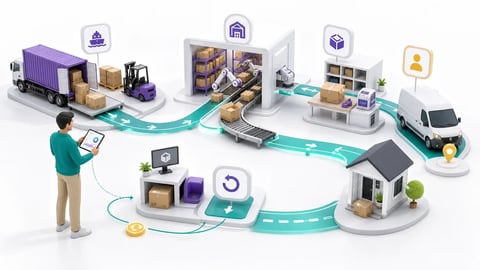
Switching fulfillment methods mid-operation is one of the highest-stakes operational moves a seller can make. Unlike a listing tweak or pricing adjustment, a fulfillment switch reshapes your entire supply chain, customer experience, and account health all at once. Whether you're moving to trim storage fees or to reclaim control over shipping, the transition touches inventory, performance metrics, and competitive positioning simultaneously. This guide builds on our overview of Amazon FBM vs FBA and the broader fundamentals in Amazon FBA and Fulfillment, so you can switch without losing momentum.
What are the main challenges sellers face when switching from FBA to FBM or vice versa?
What are the main challenges sellers face when switching from FBA to FBM or vice versa? They tend to cluster around three areas: reconfiguring listings correctly, moving inventory without creating gaps, and protecting the account health you've worked hard to build. Get any one of those wrong and you risk suppressed offers, unhappy customers, or a dip in the Buy Box.
Here's how to change amazon Seller account from FBA to FBM inside Seller Central:
- Open Manage Inventory and select the SKUs you want to convert.
- Use the "Change to Fulfilled by Merchant" action (or "Change to Fulfilled by Amazon" if reversing).
- Create a removal or disposal order for any units still sitting in Amazon's warehouses.
- Update handling time, shipping templates, and default shipping settings so orders route correctly.
- Confirm each listing is active and priced right before your first merchant-fulfilled order lands.
The most common pitfalls are units left stranded in fulfillment centers, listings that quietly revert or show as inactive, and incorrect shipping settings that suppress your offer. Timing matters here too: if you convert to FBM while units are still processing, Amazon may finish processing those units afterward, leaving you with a dual-channel situation and mixed fulfillment behavior on the same SKU. Because these changes can ripple straight into your metrics, many brands run a hybrid setup during the switch or lean on an expert partner to manage the cutover cleanly.
What are the most common inventory management mistakes sellers make when moving from FBA to FBM or vice versa?
Inventory is where transitions most often break down. The usual culprits are miscalculating available stock, forgetting to update or map SKUs across fulfillment types, and failing to sync quantities between systems. Any of these can trigger three expensive problems:
- Overselling when your listed quantity doesn't reflect what you can actually ship.
- Stockouts when units are in transit or awaiting removal and show as unavailable.
- Stranded inventory left in Amazon warehouses accruing storage fees while sales stall, since Stranded inventory is FBA inventory sitting in fulfillment centers without an active offer, meaning it isn't even available for sale.
The safest approach is a phased migration. Draw down FBA inventory before flipping SKUs to FBM, reconcile your counts daily during the changeover, and keep a small buffer of hybrid inventory so a single popular item never goes dark. Splitting fulfillment across both methods lets you test demand and shipping performance before fully committing, which minimizes disruption and keeps revenue steady.
How does switching between FBA and FBM affect seller performance metrics (such as order defect rate and late shipment rate)?
When you move to FBM, you own the shipping promise that Amazon previously guaranteed—so your order defect rate (ODR) and late shipment rate suddenly depend on your own logistics. Missed handling times, tracking that doesn't upload, or a carrier delay can all push metrics into the danger zone and threaten your performance.
To protect performance through the transition:
- Set realistic handling times you can consistently beat, not aspirational ones.
- Upload valid tracking promptly and confirm shipments before the deadline.
- Monitor ODR, late shipment rate, and negative feedback daily for the first few weeks.
- Communicate proactively with buyers when anything slips, and use tools like Request a Review to reinforce positive experiences.
This is where proactive oversight pays off. Working with a partner who acts as an extension of your team—watching metrics, catching listing issues early, and auto-raising cases when something breaks—keeps small hiccups from becoming suspension-level problems. A hybrid model also gives you a safety net, so demand spikes don't overwhelm your in-house shipping.
How do shipping costs and delivery times compare between FBA and FBM?
FBA bundles pick, pack, ship, and returns into per-unit fees, and those units earn the Prime badge with fast, reliable delivery that customers expect. FBM shifts those costs to you—carrier rates, packaging, labor, and returns handling—which can be cheaper for large, heavy, or slow-moving items but harder to make competitive on speed. Watch for hidden costs on both sides: FBA storage and aged-inventory surcharges versus FBM's negotiated shipping rates and staffing. There's also a pricing trap sellers frequently run into: when you switch to FBM, your total price—product plus shipping—can end up above Amazon's competitive price threshold, often benchmarked against your old FBA price, and that alone is enough for Amazon to suppress the Buy Box even on your own listing.
Delivery time is the deciding factor for many buyers. Losing Prime eligibility can dent conversion, while inconsistent FBM shipping erodes satisfaction and reviews. A hybrid approach—FBA for fast-moving, Prime-critical SKUs and FBM for bulky or margin-sensitive products—lets you optimize cost and delivery speed at the same time while managing risk. It's the reason brands routinely see conversion gains when fulfillment and merchandising are aligned rather than treated as one-size-fits-all. For deeper insight into how your listing presentation affects buyer decisions during a fulfillment transition, explore What are some common mistakes sellers make when optimizing their Amazon listings?
Unlock the full potential of your e-commerce business by mastering Amazon FBA and fulfillment strategies. If you're ready to streamline your operations and boost your sales, explore more of our expert insights or reach out with your questions today. Take the next step toward growing your Amazon business with confidence!


/Logos/SupplyKick/SupplyKick-Logo_White.svg "SupplyKick-Logo_White")